A broken printer driver, a locked account, a stubborn software install, none of these require someone to walk across an office anymore, let alone drive across town to reach it. A help desk technician can see the exact same screen the user sees and fix the problem from wherever they happen to be sitting.
This shift toward remote support for distributed teams has quietly become the default way most technical issues get resolved, not the exception reserved for simple cases.
MetricNet’s benchmarking database, drawn from desktop support teams around the world, puts the average share of incidents resolved on the very first contact at about 84%, ranging from a low of roughly 70% to a high of 97% among top performers. Those numbers only make sense once you understand how much of that work never required anyone to show up in person.
Key Takeaways
- Remote support lets a technician view and control a user’s screen over a secure connection, resolving most issues without physical travel.
- MetricNet’s worldwide benchmarking puts average first-contact resolution for desktop support at about 84%, with top performers reaching 97%.
- Attended sessions require the user to approve access in real time, while unattended access lets technicians reach a pre-authorized device without anyone present.
- Faster resolution and lower travel costs are the headline benefits, but proper authentication and session logging are what keep remote access trustworthy.
- A small number of issues, mainly hardware failures, still genuinely require someone on site.
What Remote Support Actually Is
Remote support is a category of software that lets a technician connect to a user’s computer or device over the internet, see its screen in real time, and either walk the person through a fix or take control directly to resolve the issue. The user’s device does not need to change location, and neither does the technician.
This differs slightly from general remote access, which more broadly covers reaching any system remotely. Remote support narrows that down to the technician-assisted troubleshooting scenario: someone has a problem, and someone else is fixing it from another location.
|
Pro Tip: Confirm whether your help desk tool supports both attended and unattended sessions. Attended access covers live troubleshooting; unattended access covers after-hours maintenance on devices nobody is sitting at. |
Why Most Issues Never Need a Technician in the Room
The instinct to send someone on site comes from an era when IT problems meant physically opening a machine. Most modern issues, software glitches, account lockouts, configuration errors, driver conflicts, live entirely inside the operating system a technician can already see and manipulate remotely.
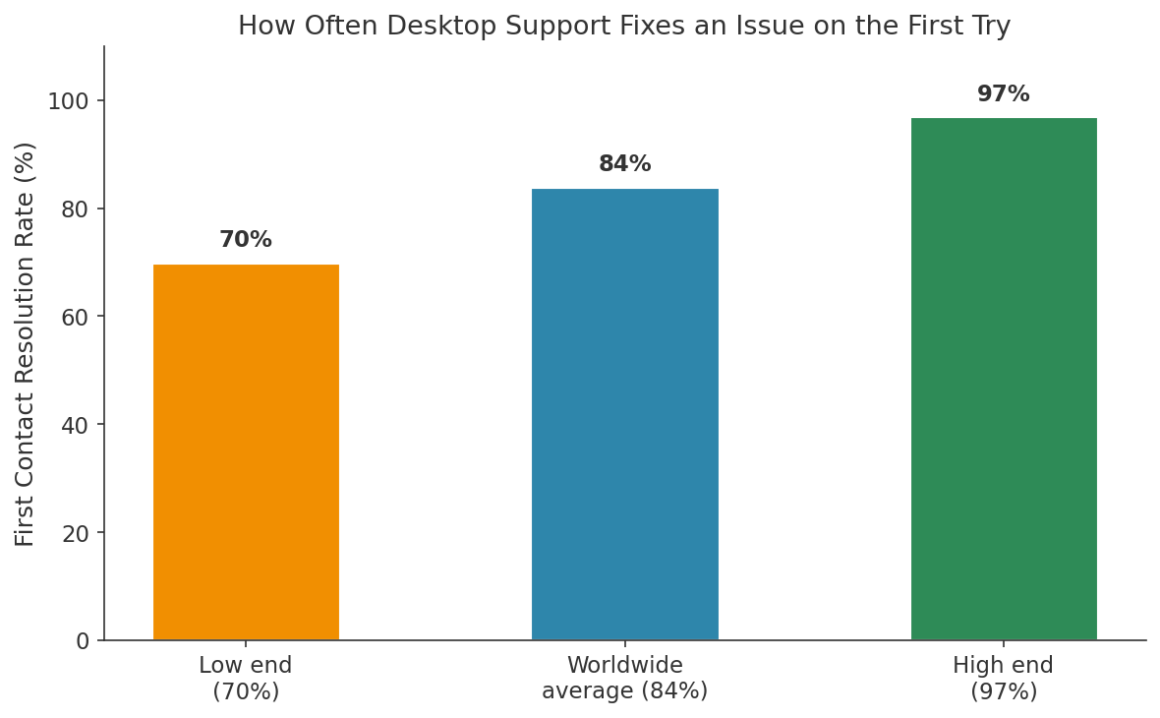
“The average Incident First Contact Resolution Rate for Desktop Support organizations worldwide is about 84%, varying from a low of about 70% to a high of 97%.” — MetricNet
Organizations at the top of that range generally combine well-trained technicians with strong remote tooling and a solid knowledge base, letting them resolve the overwhelming majority of tickets without ever having to schedule a physical visit to the user’s desk.
How a Typical Remote Support Session Works
The Ticket Comes In
A user reports an issue through a portal, email, chat, or phone call. The ticket gets logged, categorized, and routed to an available technician, often automatically based on issue type and priority.
The Technician Connects
For a live, user-approved session, the person receives a prompt to approve the connection, keeping them in control of when access begins and ends. On a device that already has standing permission, an unattended connection can begin without anyone needing to be present.
Diagnosis and Resolution
Once connected, the technician sees the user’s screen exactly as it appears to them. From there, most fixes involve adjusting settings, reinstalling software, clearing a cache, or walking someone through a few clicks, work that takes roughly the same amount of time whether the technician is down the hall or on another continent. The main variable is the complexity of the issue, not the physical distance between the two people involved.
Session Closure and Logging
The session ends, the ticket closes, and a record of what happened stays on file. That log matters both for future troubleshooting and for demonstrating that access was appropriate and time-bound.
Site Visit vs. Remote Session
The table below compares what actually changes between sending a technician on site and resolving the same issue remotely.
|
Factor |
On-Site Visit |
Remote Support Session |
|
Typical response time |
Hours to a full day |
Minutes |
|
Travel cost |
Mileage, time, sometimes lodging |
None |
|
Coverage area |
Limited by technician location |
Anywhere with an internet connection |
|
Best suited for |
Hardware failures, physical installs |
Software, configuration, account issues |
|
Documentation |
Often manual notes |
Automatic session logs |
The Access Question Behind Every Remote Session
Every remote session means granting someone temporary access to a system they do not normally use. Understanding how privileged access management actually works explains why the best help desk tools scope that access tightly and log it thoroughly, rather than handing out broad, standing permissions that outlive the ticket that created them.
Teams that have already worked through a downtime impact assessment tend to treat remote support as part of that same resilience picture. Faster resolution is not just a convenience; it is one of the more direct ways to shrink the financial cost of an outage.
What Separates a Good Remote Support Setup From a Risky One
Not every remote access tool is built with a professional help desk in mind. When evaluating a setup, prioritize:
- Clear consent for attended sessions: users should always see and approve when a technician connects to their device.
- Scoped, time-limited access: permissions should expire with the ticket, not persist indefinitely.
- Full session logging: a record of who connected, when, and what changed supports both security reviews and future troubleshooting.
- Cross-platform reach: a distributed workforce means devices running different operating systems, not just one standard build.
- Strong authentication for technicians: the accounts capable of remotely accessing user devices deserve the strongest protection in the whole system.
Organisations mid-way through an Office 365 hybrid migration often discover this the hard way, since the support burden spikes right when the environment is most inconsistent, making solid remote tooling more valuable, not less.
Getting Started: A Simple Rollout Checklist
- Choose a tool that handles both live, user-approved sessions and unattended connections, since help desks need both.
- Set up scoped permissions so technicians only reach the systems relevant to their role.
- Confirm session logging is enabled and reviewed periodically, not just collected and ignored.
- Train technicians on getting clear user consent before starting an attended session.
- Reserve on-site visits for genuinely physical problems, and measure how often that actually happens.
Frequently Asked Questions
Is remote support the same thing as remote access?
They overlap but are not identical. Remote access is the broader capability to reach a system from elsewhere. Remote support specifically describes a technician troubleshooting a user’s device on their behalf.
Can remote support fix hardware problems?
Only indirectly, through driver updates or configuration changes. A failed hard drive or a broken screen still needs a physical visit or a hardware swap.
How does a user know a technician is connected to their device?
In an attended session, the user grants the connection first and typically sees an on-screen indicator for its full duration. Unattended access is reserved for pre-approved devices, usually with logging that records every connection.
Is remote support secure enough for sensitive company systems?
It can be, with the right safeguards. Scoped permissions, strong technician authentication, and complete session logs are the baseline protections that make remote access defensible rather than risky.
Why do some IT tickets still take days to resolve?
Complexity, not distance, is usually the reason. A tier-one password reset resolves in minutes no matter where anyone is sitting, while a multi-system integration issue can take days whether support is delivered remotely or in person.
Does remote support work for employees using personal devices?
Yes, provided the device runs a supported operating system and the user grants access. Many help desks maintain separate policies for personal versus company-issued hardware.
Why the Site Visit Became the Exception
The math behind remote support is straightforward. Most fixes live inside software, not hardware, and a technician who can see a screen can usually resolve what is wrong with it, regardless of the distance between them and the user. The fact that this now feels obvious is itself a sign of how completely the assumption has shifted over the past decade.
The site visit has not disappeared, but it has become the fallback rather than the default. For a help desk trying to serve a distributed team quickly and affordably, that shift alone explains most of the resolution-time improvements organizations report after investing seriously in solid remote tooling and properly trained technicians.
References
MetricNet, Desktop Support Metrics: Incident First Contact Resolution Rate, 2020 — https://www.metricnet.com/desktop-support-metrics-part-5/
Fortinet, What Is Privileged Access Management (PAM)? How Does It Work?, 2026 — https://www.fortinet.com/resources/cyberglossary/privileged-access-management
Splashtop, What Is Remote Support? IT Support for All Devices from Anywhere, 2026 — https://www.splashtop.com/blog/what-is-remote-support
Fact Check: All statistics and data points in this article were verified against original sources as of August 20, 2026. Sources are listed in the References section.
About The Author